Validate the asset live, without sending anyone to the field.
The specialist guides the customer's camera angle in real time, through the browser, and closes the questionnaire, the signature and the report inside the call itself. No travel, nothing to install, everything on record.
Sending a specialist to the field costs real money and burns days.
The asset is far away, spread out or hard to reach, and the calendar of the person who knows the subject is locked. The per diem, the trip and the lost time go into the cost of every inspection. And most of them did not need a visit, they needed the right pair of eyes, at the right moment.
From opening to report, without travel.
- 1 Open it and send the link.
Create the inspection and send the link by message, email or SMS. Invite whoever else needs to follow along.
- 2 The customer joins through the browser.
Nothing to install, just click. Camera and microphone are checked before joining.
- 3 The specialist guides it live.
Guides the angle and the framing in real time, says what is needed and records photo and video, with the origin of each piece of media recorded on the inspection.
- 4 The report closes in the call.
When it ends, the report is generated with the answered questionnaire, the signature and the recording attached to the inspection.
The call becomes evidence, not just a phone call.
Each stage of the remote mode is a real product capability, with the UI the specialist actually uses. It is not about recording a conversation: it is about guiding, recording and closing the report inside the same room.
The specialist leads, instead of hoping the customer gets it right.
The person who knows the asset guides the angle they need and, over the live image itself, marks the spot that calls for evidence (collaborative drawing) and captures the photo on the spot. The evidence is born from the specialist's judgment, not from the luck of whoever is holding the phone.
And the room gathers the rest in one place: the inspector, customer and guest roles, each with its own permission, the chat to align what is missing without cutting the video, your operation's questionnaire to answer item by item and the signature to collect before ending.
The result: evidence leaves improvisation behind. You decide what goes into the report, with nothing left to fix later, and the person on the other end only needs to point the camera where the specialist asked.
See a demo of the room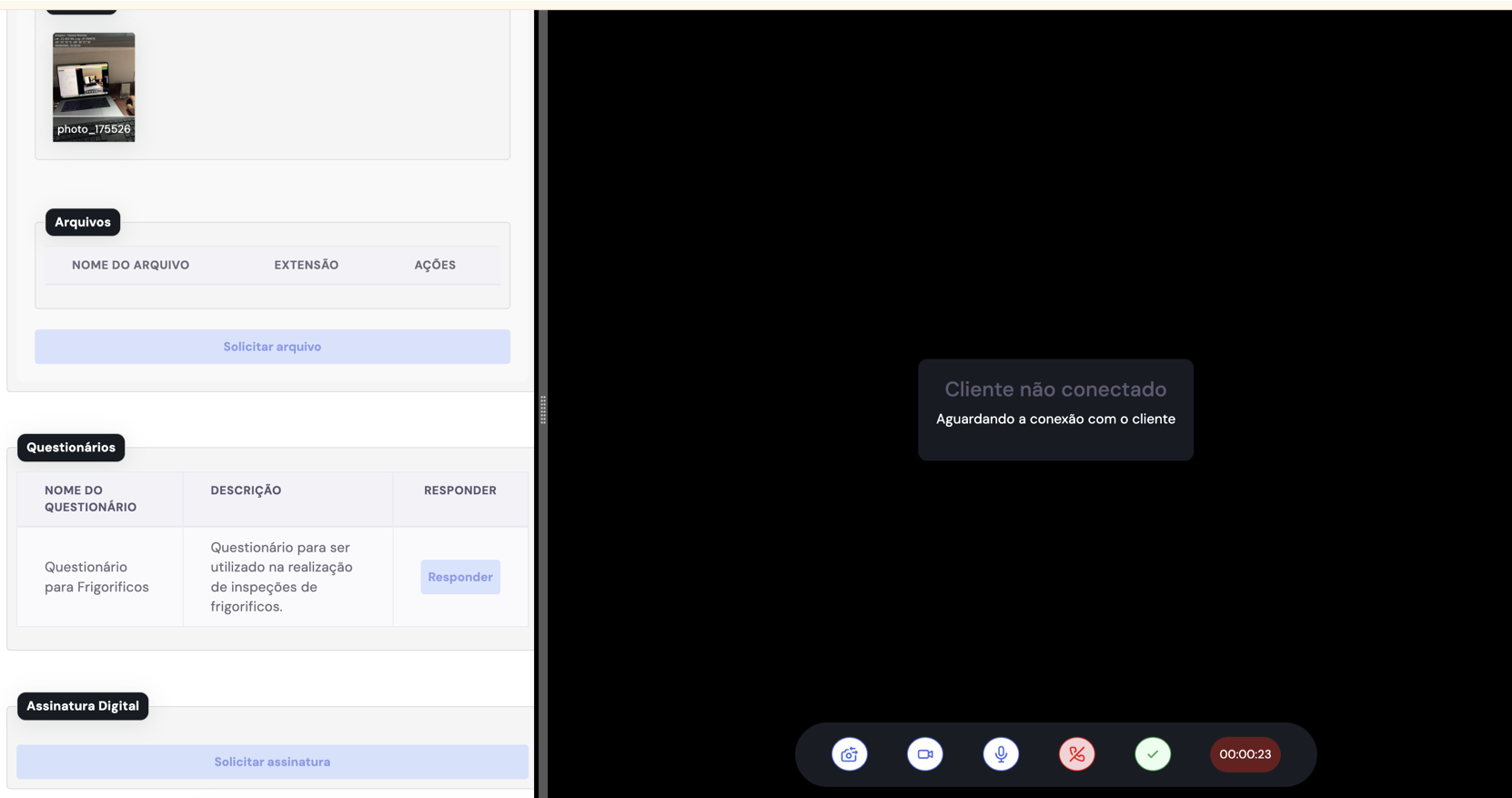
The same inspection runs bureau checks and talks to your system.
Guided capture is only one layer of the evidence. Every inspection can run bureau checks on individuals and companies to verify who is on the other side, and the platform is headless: it opens inspections, receives the result and fires webhooks through the API, to land in your ERP, your workflow or your CRM.
The result: anti-fraud does not stop at the image. Media provenance adds to the document check, and the report lands straight in the system that already runs your operation.
Talk about bureau checks and integration- Individual and company bureau
Document checks to validate who signs and who answers for the inspection.
- B2B API and webhooks
Headless opening and event-based returns, to integrate with your system.
- Process and automation
A completed inspection can trigger the next phase of your operation by rule.
What the customer already has on hand also goes into the inspection.
Not every piece of evidence is born in the call. An invoice, a manual, an old photo or a previous report can be uploaded and attached to the inspection, with the origin of each file recorded. The call runs in the browser, with no app to install and no account to create, and camera and microphone are checked before joining.
The result: everything that supports the case stays in one place, next to the recording and the questionnaire, and nothing gets lost over email.
See a demo of the room- PDF invoice.pdforigin recorded · 18/06/2026
- IMG previous-photo.jpgorigin recorded · 18/06/2026
- DOC previous-report.docxorigin recorded · 18/06/2026
Remote is one mode of a single system.
The call does not live on its own. Every remote inspection lands in the same queue, inside your workspace, with your team and your access rules. It is your system, not someone else's.
Every inspection, in any mode, in the same queue.
Remote, on-site or done by the customer, everything shows up in the same list, with status, owner and filters. You track what is open, in progress and completed, and act in bulk when you need to.
Your team, your access rules and usage by mode.
Each workspace has its own members, roles and access rules. And the wallet shows the balance per mode, so you buy by package or pay as you go, with each call, recording and report deducted from the right balance.
See a demo- 18/06/2026Remote inspection completed-1
- 17/06/2026Remote package purchased+100
- 17/06/2026Call recording-1
The hard facts, for whoever evaluates.
The capabilities of the remote mode and the platform, without the runaround, split between what happens in the room and what the platform does around it.
In the remote room
- Live video in the browser, no app to install and no account to create
- Camera and microphone check and a waiting room before joining
- Inspector, customer and guest roles, each with distinct permissions
- Annotation over the live video (collaborative drawing on the image)
- In-call chat to align what is missing without cutting the video
- Call recording attached to the inspection
- Capture and attachments with the origin of each piece of media recorded on the inspection
- Questionnaire with conditional logic answered in the room
- Signature collected in the call and report generated when the inspection is completed
On the platform
- Bureau checks on individuals and companies
- API and webhooks for B2B integration
- Inspection batches opened via Excel
- Credit wallet per inspection type, with transaction history
Any asset that is far away, spread out or hard to reach.
Whenever a specialist needs to validate without going to the site. Crops and rural property. Construction stages and progress measurement. Real estate and property. Industrial equipment and assets. Insurance claims and risk.
Remote is not just a video call.
The backing behind +100,000 inspections accumulated and +15,000 per crop season, proven at scale in Brazil.
- What sustains the evidence
Capture guided by the specialist, the call recorded, every piece of media with its origin recorded and bureau checks on individuals and companies. The evidence leaves the conversation and becomes a traceable report, with the same chain of custody as the other modes.
- What the result releases
The report enters your system and releases the next step: the measurement, the billing or the dispatch.
- Who controls it
The buyer controls what the evidence releases, and the counterparty has no room to dispute it.
"Has remote video not become a commodity?"
Loose capture, yes. The difference here is assisted remote inspection: the specialist guides and validates live, calls the angle and framing they need and answers the questionnaire in the room, and the result enters the same evidence trail as the rest of uInspect. It is not about recording a call, it is about closing a report that holds up.
"What if the customer cannot handle the camera?"
The specialist leads: they call the angle they need and guide the framing in real time, marking the spot to record over the image. The call runs in the browser with nothing to install and stays recorded for review. The layperson on the other end only needs to point the phone.
Three modes, one standard
On-site, remote or done by the customer: the same platform, the same chain of custody and the same report that holds up when disputed.
Take travel out of the cost, without taking out the evidence.
See assisted remote inspection close a report that holds up when disputed.